

Turn Customer Data Into Targeted Audiences
A customer segmentation tool that unifies your data and builds precision audiences. Analyse your entire customer base, build precision segments, and sync them to dozens of marketing platforms automatically. One platform for analytics, segmentation, and activation.

Your Customer Data Is Everywhere Except Where You Need It
Contacts in one system. Account data in another. Marketing lists exported manually. Every campaign starts with the same tedious process: pull data, clean it, build a list, upload it somewhere else. By the time you're ready to launch, the data is already stale. And nobody has a clear picture of who your best customers actually are.
The current reality
- Customer data scattered across multiple systems
- Manual CSV exports for every campaign
- Hours spent cleaning and deduping lists
- Guesswork targeting based on incomplete data
- Stale audiences by the time campaigns launch
- No visibility into customer composition
With Q Audiences
- Natural language queries with Ask Q - build segments in plain English
- AI-powered recommendations, not just dashboards
- One-click segment creation from query results
- Unified customer view from BigQuery data
- Sync to dozens of marketing platforms automatically
- Export to CSV for offline analysis
Build Audiences in Plain English. Activate Them Everywhere.
The only audience platform with natural language queries and AI recommendations built in. Ask questions, get segments, sync to dozens of marketing platforms.
Complete customer intelligence - Q Audiences analyses, segments, and activates automatically.
Real-Time Analytics
Aggregated customer metrics and visualisations updated every 5 minutes
AI-Powered Insights
Automated recommendations, not just dashboards. Identify risks, opportunities, and next actions.
Visual Segmentation
Build audiences with filters or plain English queries via Ask Q
Auto-sync
Push segments to dozens of marketing platforms on any schedule
Common actions that take seconds, not hours
Build Segments in Four Simple Steps
From filter criteria to live marketing campaigns in minutes.
Define Your Audience with Precision Filters
Build complex targeting rules using any combination of fields. Start simple or go deep with computed traits and audience membership.
- Filter by 20+ fields including industry, tier, and location
- Use computed traits like LTV, Total Events, and Client Tier
- Nest audiences - include or exclude members of other segments
- Combine rules with AND/OR logic for complex targeting

See Who Matches Before You Save
Real-time preview shows exactly which contacts or accounts match your criteria. Export to CSV for offline analysis or inspect the underlying SQL.
- Live member count updates as you add filters
- Preview sample members with key fields
- Export to CSV for Excel, Google Sheets, or offline analysis
- View generated SQL query for technical validation

Analyse Your Audience Composition
Built-in analysis tools help you understand who's in your segment and how it overlaps with others.
- Audience Insights shows distribution by any field
- Interactive charts (bar/pie) with drill-down to members
- Compare Segments with Venn diagram visualization
- See exact overlap, unique to A, and unique to B

Activate Your Audiences Automatically
One-click sync sends your segments to dozens of marketing platforms. Set a schedule and keep audiences always in sync.
- Sync to ad platforms, email tools, CRMs, and more
- Automatic field mapping with customizable defaults
- Schedule: Manual, Daily, Weekly, or Hourly
- Monitor sync status and history in real-time

Why Teams Choose Q Audiences
Build segments in seconds, not sprints. Activate across every channel. No engineering required.
No-Code Segmentation
Build audiences using plain English. Ask "show me customers who purchased in the last 90 days but haven't opened an email" and get results instantly. No SQL, no technical skills required.
Real-Time Data
Q Audiences connect directly to your data warehouse. No ETL pipelines, no stale data, no sync delays. Your segments reflect reality, not yesterday's snapshot.
Activate Everywhere
Push segments to Google Ads, Meta, LinkedIn, HubSpot, Salesforce, and dozens more platforms. One audience, every channel - activated in minutes.
Your Data, Ready to Use. Automatically.
Q Audiences connects to your existing customer data and makes it instantly usable. No manual setup, no field mapping, no waiting for IT. Your filters, charts, and segments just work.
Automatic Field Discovery
Every field in your customer data becomes a filter option automatically. Industry, location, lifetime value, job title - if it's in your data, you can filter by it.
Smart Filter Types
The system knows the difference between text, numbers, and dates. You'll see dropdown menus for categories like "Industry" and range sliders for numbers like "Lifetime Value."
Always Up to Date
When your data team adds new fields, they appear in the segment builder automatically. No tickets, no waiting, no manual updates needed.
Connected Data
Filter contacts by their company's properties, accounts by their deal history, or even chain across multiple relationships. No configuration needed - connections are discovered automatically.
See Your Entire Customer Base in One View
The Customer Analytics Dashboard aggregates data and gives you real-time visibility into your customer composition, industry distribution, and lifetime value patterns.
- Summary metrics: Total contacts, accounts, marketing opted-in, active segments
- Visual breakdowns by industry and client tier
- Top clients ranked by lifetime value
- Multi-tenant architecture with complete data isolation
- Auto-refreshing data every 5 minutes
No more spreadsheets. No more guessing. Just clear visibility into your customer base.

Build Segments in Minutes
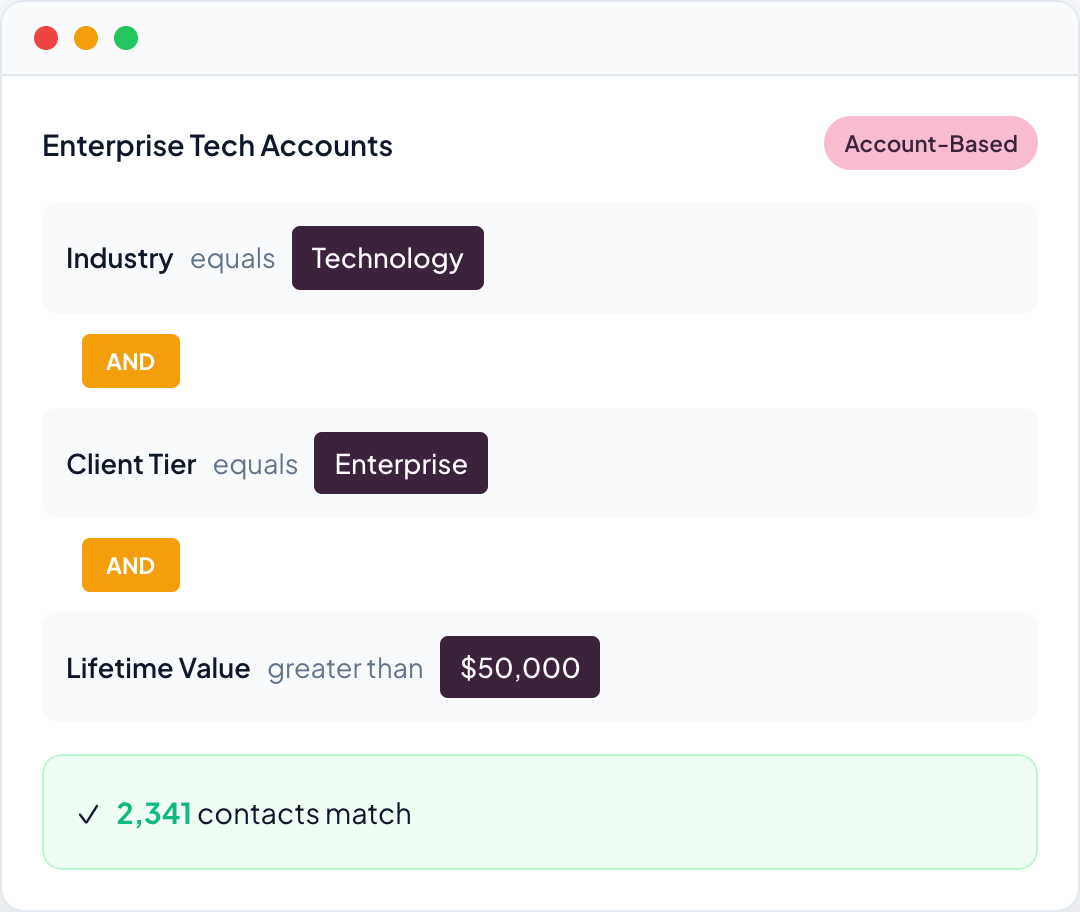
Create precision audiences using a visual filter interface. Combine any fields with AND/OR logic, see real-time member counts, and preview exactly who matches before you save.
- Contact-based or Account-based segment types
- Filter by industry, tier, lifetime value, location, job title
- Computed traits filtering (LTV, Total Events, Client Tier from dbt)
- Real-time member count as you build
- View generated SQL for technical validation
Nest Audiences for Complex Logic
Include or exclude members of other segments to create sophisticated targeting. Build suppression lists, create lookalikes, or combine multiple audiences without duplicating logic.
- ``All Enterprise accounts EXCEPT those already in renewal campaign``
- ``High-value contacts who are ALSO in the webinar attendees segment``
- Reference any existing segment as a filter condition
- Automatic updates when parent segments change

Understand Your Audiences
Built-in analysis tools help you understand segment composition and overlap. View distribution charts, drill down to individual members, and compare segments with Venn diagrams.
- Audience Insights modal with bar/pie charts
- Click any chart segment to drill down to members
- Compare two segments with Venn diagram visualization
- See exact overlap, unique to A, unique to B

Sync to Dozens of Platforms
One-click sync powered by Q Acts sends your segments to ad platforms, email tools, CRMs, and more. Set schedules and your audiences stay fresh automatically.
- Connect to ad platforms, email tools, CRMs, data warehouses
- Automatic field mapping with customizable defaults
- Schedule: Manual, Daily, Weekly, or Hourly
- Real-time sync status monitoring and history

Export Anytime for Offline Analysis
Not everything needs to be automated. Export any segment to CSV for analysis in Excel, Google Sheets, or your favorite BI tool. Full control over your data, always.
- One-click CSV export from any segment
- Include all member fields or select specific columns
- Perfect for ad-hoc analysis and reporting
- No sync setup required - just download and go

Everything You Need for Audience Management
From analytics to activation, Q Audiences covers the complete customer intelligence workflow.
Analytics Dashboard
Summary metrics, industry breakdown, tier distribution, and top clients by lifetime value.
AI Insights
AI-powered recommendations for risks, opportunities, and next actions.
Ask Q
Natural language queries with one-click segment creation from results.
Visual Segmentation
Build audiences with AND/OR filters and real-time member preview.
Audience Nesting
Include or exclude members of other segments for complex targeting.
Audience Insights
Distribution charts with drill-down to individual members.
Segment Comparison
Venn diagram visualisation showing overlap between audiences.
Auto-Sync
Scheduled syncs to ad platforms, email tools, and CRMs via Q Acts.
CSV Export
Download segment members anytime for offline analysis.
Security & Data Governance
Enterprise-grade security with complete data isolation and access control.
Your data stays yours
Data never leaves your environment. We deploy to your Google Cloud project.
Row-level security
Users only see their authorised data.
Query audit trail
Every query logged for compliance.
GDPR compliant
No personal data in analytics. Data processing agreements available.